
restaurants, cafés, and hotels that decide to move away from paper menus usually choose one of two options. They either convert their existing menu into a PDF and connect it to a QR code, or they switch to a genuine digital menu system designed specifically for mobile devices.
At first glance, both options seem to do the same thing. The customer scans a QR code with a smartphone and the menu opens. However, once you look at the details, important differences begin to appear in areas such as ease of use, menu updates, mobile compatibility, and multilingual support.
In this article, we will compare both options and explain which solution is more suitable in different situations.
What Is a PDF Menu?
In simple terms, a PDF menu is created by saving an existing menu design as a PDF file, uploading it online, and linking that file to a QR code. When customers scan the code, the PDF opens directly on their phones.
If you already have a completed menu design, this can be a quick solution. You may be able to create a QR code menu within half an hour.
However, PDF files are generally designed for printing, not for smartphone screens. This difference becomes immediately noticeable when customers try to use the menu on a mobile device.
What Is a Digital Menu and How Is It Different?
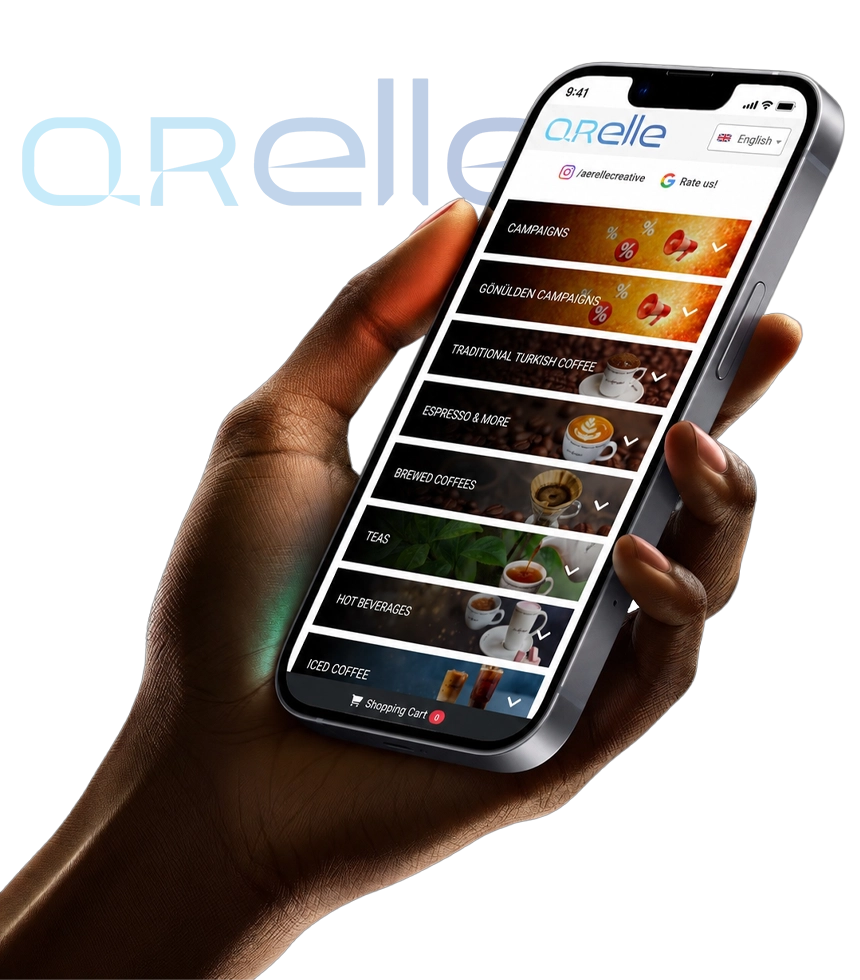
A digital menu is an online system designed specifically for mobile screens. Products are organised into categories, and each product can include a name, description, price, photograph, ingredient details, and allergen information.
From the customer’s perspective, the process may appear similar. The customer scans a QR code and the menu opens in a browser. Behind the scenes, however, the system works very differently.
The business owner can access a management panel and change prices, add new products, update descriptions, or temporarily remove an item from the menu with just a few clicks.
Where Does the Main Difference Appear?
The most important difference is simple. A PDF is a fixed document, while a digital menu is a live and manageable web page.
With a PDF menu, customers often need to zoom in to read the text. If the menu contains several pages, they may need to scroll up and down repeatedly to find the product they are looking for.
This can become frustrating, especially for customers who are in a hurry or sitting at a crowded table.
A digital menu provides a more organised experience. Products are divided into categories, allowing customers to open sections such as main courses, desserts, or drinks directly.
Although this may seem like a small detail, it can significantly reduce the time customers spend searching through the menu.
Which Option Is More Comfortable on Mobile Devices?
PDF files do not automatically adjust themselves to different screen sizes. A page designed for A4 printing becomes very small when displayed on a phone, making the text difficult to read.
Customers often need to zoom in and move around the page continuously.
A mobile compatible digital menu automatically adjusts to the screen of the device. Text remains readable, images are displayed correctly, and buttons are large enough to be tapped comfortably.
For busy cafés and restaurants, this difference can create a major improvement in customer experience.
What Happens When the Menu Needs to Be Updated?
To change the price of a product in a PDF menu, you first need to find the original design file. You then make the change, create a new PDF, upload it, and replace the old version.
This process may seem simple, but problems can occur. The QR code may continue to open the old file, or the wrong version may be uploaded. File management therefore needs to be handled carefully.
With a digital menu, the process is much easier. You log in to the management panel, change the price, and save it. The QR code remains the same, while the menu is updated immediately.
Products that are out of stock can be hidden temporarily, and seasonal categories can be added or removed just as easily.
Product Images and Descriptions
Adding many photographs to a PDF increases the file size. This may cause the menu to load slowly, particularly when the customer has a weak mobile connection.
In a digital menu, images can be optimised individually. The customer only loads the content and images needed for the part of the menu currently being viewed.
This makes the system faster and more efficient.
A digital menu also provides more flexibility for product information. Ingredients, portion sizes, preparation methods, spice levels, and allergen warnings can all be displayed in a clear and organised way.
What If You Need a Multilingual Menu?
For businesses that regularly serve international customers, multilingual menu support is extremely important.
With a PDF menu, a separate file usually needs to be created for each language. Turkish, English, German, French, and other versions must all be designed, updated, and uploaded separately.
Customers may also need an additional page where they can select the correct language version.
With a digital menu, customers can choose their preferred language directly within the menu. Product names and descriptions in different languages can be managed from a single panel.
For restaurants, hotels, cafés, and beach clubs in tourist areas, this feature can simplify daily operations considerably.
Does a PDF Menu Have Any Advantages?
Yes. A PDF menu can still be a practical solution for small businesses with only a few products, stable prices, and no need for advanced features.
If your main goal is simply to provide access to a menu through a QR code, and you value speed and simplicity, a PDF may be sufficient.
However, if your menu changes frequently, includes many products, or plays an important role in the customer experience, the limitations of a PDF will quickly become noticeable.
Which Option Should You Choose?
If you have a small and fixed menu, and your only requirement is to allow customers to access it through a QR code, a PDF menu may be enough.
However, if your prices change regularly, you want to serve customers in multiple languages, you use product photographs, or you want to offer a more comfortable mobile experience, a digital menu is the more logical choice.
A digital menu is not simply a paper menu transferred to the internet. It is a live and manageable system that helps businesses organise products, maintain control over menu content, and provide customers with a more practical experience.
With Qrelle, you can organise products into categories, update prices instantly, publish your menu in multiple languages, and create a QR code designed specifically for your business.
You can move to a modern and manageable digital menu without dealing with multiple PDF files or repeated design changes.